1197: All Adobe Updates
| All Adobe Updates |
 Title text: ALERT: Some pending mandatory software updates require version 21.1.2 of the Oracle/Sun Java(tm) JDK(tm) Update Manager Runtime Environment Meta-Updater, which is not available for your platform. |
Explanation[edit]
This comic was probably a reaction to the installation service Ninite removing Adobe Flash Player from their free version the previous day.
The comic makes fun of Adobe Systems software that delivers new versions of Adobe products to users' computers, such as Adobe Updater (which replaced Adobe Update Manager) and Adobe Download Manager (which replaced Akamai). These software increments might either be technical (to fix compatibility or security issues), or they might add new features that would go unnoticed. In addition, these updates are downloaded automatically by default, but the operating system might install them only if a user allows it to. The frequency of software changes (and changes in the way Adobe allows users to download new software) could result in confused users. In this case, the comic is saying that you must update the program before it can actually check for updates, something it already seems to be doing.
There is an actual message that a specific version of these updaters display:
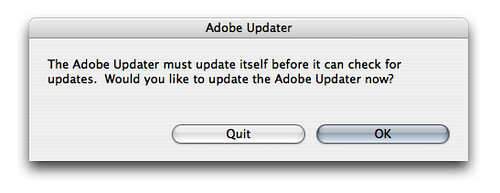
In fact, the general necessity of such update managers has often been questioned, as they require the user to "download software in order to download other software". Other notable examples of companies who use update managers include Google and Sun/Oracle, with the latter being also mentioned in the title text.
The two buttons 'OK' and 'Download' are implied to have the same effect, indicating the user has no real choice, being both apparent "Affirmative commit" options. When choices are presented, there should ideally be one unambiguous "positive action" option (e.g. Yes/Ok/Install/Download/<Do the next expected response>) followed by one "negative action" one (e.g. No/Cancel/Do not install/Skip/<Don't give the next expected response>), to fit the dialogue ("Do you wish to install? [Yes/No]", "Proceed to installation? [Ok/Cancel]", or perhaps "The installation process was paused, abort? [Yes, do not install/No, continue with installation]"), with the possible separate use of "Cancel", or equivalent term, to add a "no action" to avoid either positive or negative commits ("Do you want to save changes? [Yes, save (and quit)/No, don't save (but quit anyway)/Cancel (abort the attempt to quit)]").
In the comic's system message the "Ok" is an implicit command to continue with the suggested action, especially as it is the leftmost item, though not as unambiguously connected to the wording as it could be. The use of "Ok" is more suited for a message box with only the possibility to acknowledge and clear a necessary notification of something that has/will happen, with no other course of action available.
The "Download" is more explicitly linked to the suggested action, but does not seem to complement the other item properly. Additionally, it is differently rendered, either given focus (the default action, which is often positive-to-the-left or negative-to-the-right) or because it is actually disabled (leaving "Ok", for the presumed same purpose, the only viable choice to continue with). A further possible reason for its different appearance is that it is indicating that it is the process of being clicked, or obeying the hotkey/keyboard-shortcut assigned to it, but the comic shows Cueballs hands as nowhere near the keyboard, trackpad or possibly touchscreen of the laptop, as he stares in confusion, so this is unlikely without other conditions at play.
The placement, and the perhaps more 'ready' state, of the 'OK' button implies that it is the default action. This then means that, if it unintuitively leads to the non-positive action, many users may just ignore the update. In cases where users are given a choice to skip updates (in favor of trying to do whatever they were doing when such a notification, and potentially indefinitely so) the tendency might be for users not to always keep up with the very latest updating advice. Common statistics for the high rate of un-patched systems in the wild suggest that this happens a lot.
The title text also suggests that using update helper software which in turn must be updated bears the risk of creating a dependency hell.
Transcript[edit]
- [Cueball is sitting at a laptop with a window with a red title bar floating over his head.]
- Adobe Update
- There is an update for:
- Adobe Download Manager
- This update will allow you to download the new updates to the Adobe Update Downloader.
- [OK] [Download]
 Add comment
  Create topic (use sparingly)
  Refresh
Discussion
Is there the additional joke of choosing "Ok (to download)" or "Download (it's ok!)"? And all the strip it lacks (for space, opportunity or brevity) is an all-but-forced toolbar download. Unless that's counted as part of the Java download. (Ask? Really?) 178.99.244.212 13:00, 10 April 2013 (UTC)
- In my eyes the joke goes a bit further: The window ask the user to install an update for the update-manager so it can download new updates for the update-downloader – so software A would like to update software B that might update the real software in/at the end. --DaB. (talk) 13:12, 10 April 2013 (UTC)
- Or you can just click on the close button.
I am surprised noone commented on the connection to the Rush Song 2112 and it's Oracle. 99.102.154.28 01:19, 10 August 2013 (UTC)
Title text: It's because you're still running Windows 2000 or XP. (Windows NT 5.x) You need at least Windows Vista (6.0) to apply the update... 108.162.221.53 02:13, 29 March 2014 (UTC)
Ok what is happening
In the comic's system message the "Ok" is an implicit command to continue with the suggested action, especially as it is the leftmost item [...] The placement, and the perhaps more 'ready' state, of the 'OK' button implies that it is the default action
No it's not. In modern software design, there is almost always a main action (on the right) and a secondary action (on the left). In the comic, OK means the user acknowledges the notice and closes the pop-up. The main action, Download, is highlighted and right aligned. It is common for popups to use "OK" to dismiss the message when the other action isn't related.
The use of "Ok" is more suited for a message box with only the possibility to acknowledge and clear a necessary notification of something that has/will happen, with no other course of action available.
...which is exactly the case here, since we have a different button. The joke isn't in the buttons, it's in the message itself.
The "Download" is more explicitly linked to the suggested action, but does not seem to complement the other item properly. Additionally, it is differently rendered, either given focus (the default action, which is often positive-to-the-left or negative-to-the-right) or because it is actually disabled.
It's not disabled, it's highlighted. Because it's the main action and it's on the right.
A further possible reason for its different appearance is that it is indicating that it is the process of being clicked
???????
This then means that, if it unintuitively leads to the non-positive action, many users may just ignore the update.
which is exactly the intended behaviour! It would be a terrible user experience if the user opened the software but was forced not use use it because of a new update.
I think that entire paragraph (or paragraphs, since you've expanded them) should be removed. This is a perfectly normal button placement and having it in the explanation just distracts the reader from the actual joke in the comic. --FaviFake (talk) 13:38, 7 August 2025 (UTC)
- The humour is exactly that it's a confusing and self-contradictory dialog(ue). Even if the buttons are 'normal', for some, they are confusing in the particular context.
- Paradigms may differ, especially with Adobe software that writes primarily using a platform-agnostic WM with its own peculiarites (neither Mac nor PC, etc), or be badly followed, but Windows standards (one rather thorough run-through, more Win7 era than the Win8 of the comic's era, but here's a post-comic Win11-era one as well) guide you towards positive-commits being to the left, negative-commits to follow/be on the right, non-commits (e.g. "Cancel", if applicable) even futher to the right, then "apply" (where anything is "applyable" without closing), then Help (if made available). The confusion by not making clear what "Ok" means (it should ideally be the "default yes, ok then" in the presence of a negative alternative, or just "ok, I acknowledge this" only when there is no other choice at all, just information) juxtaposed with the Download button that looks to be in Disabled mode, but (as you say) might be highlit as the default (e.g. linked to the "enter"/”space" hotkey). It's impossible to tell, with just two buttons, whether Download is darker/disabled or 'coloured'/highlit, but that looks dark/faded-and-disabled to me. (Or what the button looks like mid-click/toggled-'on', in its visually "pressed" state, but Cueball is currently hands off, so...)
- As an example that I most easily can replicate across more than two decades of the same OS, if I close an unsaved Notepad window in Win11, I get the question "Do you want to save changes to filename.txt?" and the buttons (left to right) [Save] with blue background but, more importantly, an extra black border to it, then [Don't save], then [Cancel]. The progression back to Windows2000 ("The text in the Untitled file has changed"/"Do you want to save the changes?", with [Yes][No][Cancel]), skipping a couple of generations that I don't have at hand, is consistent. As is System Properties (or equivalent) with [Ok][Cancel][Apply] (the latter greyed out/desaturated, according to OS version, without any changes cued up to actually apply).
- All these windows that can be cancelled (no changes made, no rejections/negative-commits to be made), whether or not they have an actual Cancel button, can be closed by the "x" on the dialogue top-bar (if it explicitly does not allow Cancelling, it'll be greyed/dessturated and unresponsive). It is also impossible to tell what responsiveness the "x" on Cueball's dialog has, but if unsure what the "Ok" button does (and if the Download button is inactive) then that might be what Cueball clicks once over his existential doubt about the options is overcome.
- As a meta-example, at the bottom of this page the 'buttons' are [Save changes] [Show preview] [Show changes] then Cancel and Editing Help links. i.e. Positive-Commit, Part-Positive-Commit, Part-Neutral-Commit, Abort, Help, similarly stratified...
- Original Macintoshes (I've never used anything newer than an iMac, and I forget how they looked) were always rather good at saying something like [Download][Cancel] (or possibly vice-versa), to equivalent issues, or asking "Do you want to download?" with [Yes][No] (or [No][Yes]?) as a more direct answer to the question. Linux WMs (and scratch-built dialogs using Tk-elements) have a variable design philosophy, IME, either not properly thought out or echoing the author's own expectations.
- Perhaps all we can know, right now, is that when I look at the dialog box I see one intention and when you look at it you see another intention (in 'meta', or reality, if not both). That, at least, seems to need explaining. 82.132.246.73 15:29, 7 August 2025 (UTC)
Add comment