The Explanation Improvement Project is primarily focused on improving existing explanations while also helping create new editors. Ideal candidates for This Week's Explanation for Improvement are:
1. In need of significant improvement, with an extensive scope for expansion. Short explanations (view list of shortest explanations) are often the most ideal for improvement, but longer explanations also qualify if they fail to explain the joke and are written poorly. Good concise explanations about quick and straightforward jokes should remain short, so evaluate explanations on overall quality rather than length.
2. Accessible to a broad audience or otherwise ideal for new editors. The week-long collaborative format of this project (edit-a-thon) works best for comics about relatable topics. Explanations about niche or highly technical jokes, as well as those detailing the inner workings of the comic, usually belong in the general incomplete explanations backlog instead.
3. Old or out of date. While not required, an explanation is usually a good candidate if it predates the creation of this wiki or if it needs to be updated to reflect newly available information (such as future predictions coming true). Starting from the release of comic 1079 in 2012, new explanations were featured on the Main Page for several days and are generally higher-quality as a result. Particularly, recent comics from the last few years are almost never nominated.
To experience the interactivity of the game, visit the original comic.
This explanation was found to be incomplete after being nominated for This Week's Explanation for Improvement. Although it was not featured, the nomination process revealed issues that still need to be addressed to meet our quality standards. Before removing this notice, read the August 2026 nomination and the comic discussion to ensure the issues raised by the Explanation Improvement Project have been satisfactorily addressed:
Need to remove bullet points throughout the #Explanation and #Trivia sections.
Also, clean up section #Don't contact us (don't use references or striked text, make a cohesive and clear explanation of what happened to the chatroom).
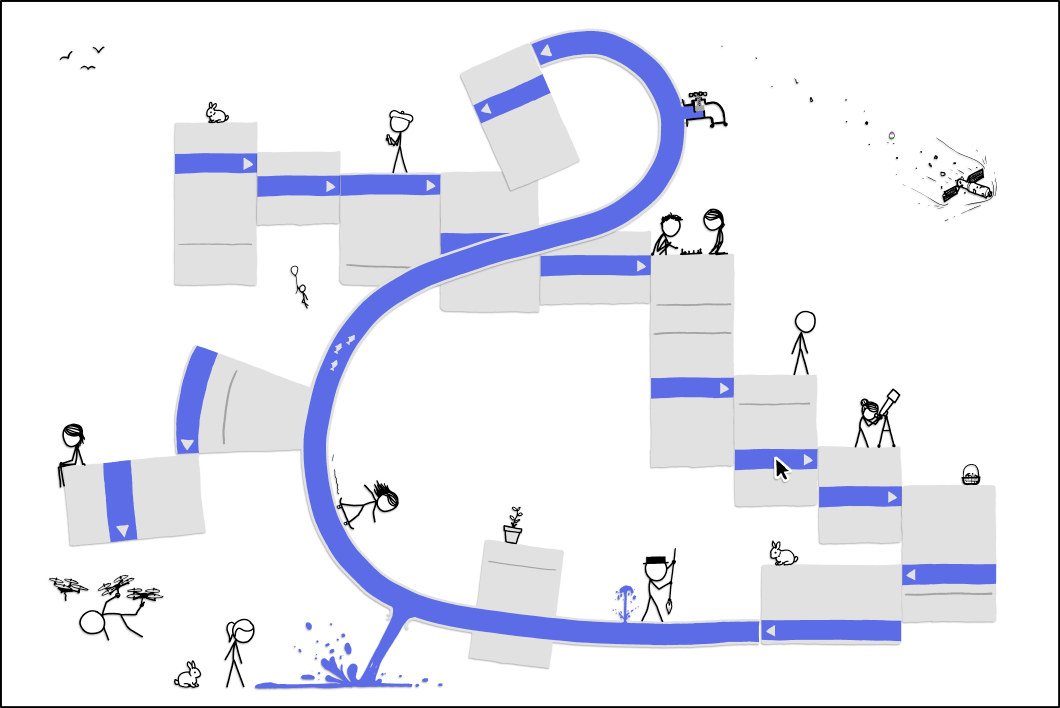
In this interactive April Fools' Day comic Cueball, presumably representing Randall, admits to the readers he built a flimsy cloud services company using spare computers and parts. Included in the cloud hardware are (from left to right) a Macintosh, several old laptops, an Alienware tower, a NintendoVirtual Boy, an old desktop with the cover off, and an AtariPong Console. He named the company after xkcd, xkcloud being a portmanteau of "xkcd" and "cloud", here pronounced XK-cloud. The portmanteau incidentally still contains all four xkcd letters in the correct order: xkcLOUd. This was later reused for the xkcd keyboard in 2150: XKeyboarCD, where the word Keyboard, has an X before the word and a C before the D with the xkcd letters capitalized.
After providing his services to various (very big) companies (Facebook, Twitter and Tumblr), that are very concerned with securing the users data, his setup failed (some portions may even have caught fire? He is not sure). This has caused him to lose the data he was required to preserve as part of his service. He thus requests the readers help to make up and re-imagine the lost data by pressing the large red button at the bottom of the comic. Preferably before Facebook & Co notice we lost it.
If you take him up on his request and push the button, you will be taken to a "survey" where you will get the chance to help by either trying to combine a posted picture with its lost text or, vice versa, by trying to combine a posted text with its lost picture. In either case you get a selection of texts/pictures to choose from but can also choose to write your own text or even draw the picture. After doing this you get to see this combination in the news feed together with several other posts (which other people have helped combine from other lost data). And then you can continue helping as long as you like.
The content of the "surveys" appear to come from reader submissions, and are different upon every click. This is thus both an interactive and a dynamic comic with only the first picture shown on top of this page. By inviting the xkcd readers to add content that will be displayed in the comic later, the result of all the interactions leads to the generation of crowd-sourced content.
It was not immediately clear if the reader-created drawings or captions are, in fact, being cycled into the surveys and feeds, or if the displayed items were all created by Randall and the reader-created content is simply discarded. With the huge amount of different comments and drawings that already appeared on the first day, and since especially the drawings look like they are created in the simple Paint app (i.e. not by Randall), there can be no doubt that most of the content is created by the users. However he must have made some pictures to get it all started, and at least one of these can be seen here.
This comic resembles last years April Fools' Day comic 1350: Lorenz where user input also generated a very complex crowd-sourced comic. In both comics it was possible to create a permalink to save a given version of the comic to share with others. An earlier comic was also related to problems with cloud computing: 908: The Cloud.
Due to the very complex nature of this comic, there are lots of details that may need an explanation. This can be found in the sections below. Note that there have been some changes and bugs regarding this comic after it was first released. Some of the pictures that are referenced below were saved before these changes took place. So consult these changes if the pictures do not match the expectations.
Extra xkcloud pages
Since this comic is so big and complicated, extra pages have been created to include much more information than is wished for on this main page (which is already of considerable size). These pages are listed here for convenience, but they are also listed in the relevant sections below:
1506: xkcloud/Transcript - A transcript of these pages with explanations for the reason for data loss and other features, such as usernames, like buttons, etc.
Functionality
Pressing the red button at the front page (shown here above) links to one of two interactive survey pages (see the pictures of all types of pages.).
All these pages have a news feed below the top post. This will be described here below.
The Lost picture page (see several pictures here) asks the reader to indicate which of eight line-drawings (see several examples here) best matches a given caption, or the reader can create their own drawing.
This can be done on the Draw one your self sub-page (see several pictures here) in a simple web-based "paint"-style app.
Note that someone found a way to copy a picture into the comic. See at least one example of this here.
The Lost text page (see several pictures here) asks the reader to indicate which of eight captions best matches the given drawing, or the reader can create their own caption and submit this instead.
These captions are user generated. See transcribed examples of these post from usershere.
In either case, at the top of the pages, we are given the Reason for the data loss. And there are many different reasons (all by account of Randall).
A list of transcribed reasons (with explanations included) can be found here.
After completing the "survey" you go to a new page appears:
The Help us recover more data page (see several pictures here) has yet another red button like the front page, but on this page it is at the top of the page, saying exactly Help us recover more data.
By pushing this button you go to one of the two "Lost" pages mentioned above.
It is possible to go back to the front page at any time by clicking the picture of Cueball sitting behind his desk in the same way as he does in the first picture on the front page.
Cueball is always present to the left on all pages after the front page.
But if you go back to the front page like this, then if you again click on the "original" red button to return to help with the recovery, you will always go back to the same page you came from (with the same posts in the news feed and if it is one of the lost data pages also with the same post to fix.)
You can thus only get to a new survey page by finishing the current task (or pressing a permalink as discussed below).
News feed
Below the "survey" or the post you just recovered (to begin with), you will be presented with a listing similar to a Facebook news feed, listing six posts of the line-drawings apparently tagged with the captions as paired up by other users survey results.
The posts are made by apparently fictional randomly-named readers (see transcribed examples of names here).
But there are only 20 user pictures. See these (and why it is known that there are only 20) as well as a description of these pictures here.
The posts are accompanied by a button similar to Facebook's "Like button" but here the button is labeled with different words which are all synonyms for want (see transcribed list of words here). So not "to like" but "to want" is the new thing in this version of Facebook.
After the first time you recovered a post, there will thus be seven posts on the Help us recover more data page, six new posts below the one you just helped complete.
The only difference when you click this pages red button (rather than when you start for the first time at the front page) is that there will now be seven posts below the one you need to fix.
These seven posts are the same as those you had on the previous page, including your own at the top.
Permalink
Next to each post there is a text Link above the "Want" button above the picture. (This goes for all three types of pages mentioned above.)
The "Link" is an actual link of the type that is called a "permalink", a portmanteau of "permanent-link".
If you wish to "save" any given post for future reference (for instance one with your own drawing) you can do so by copying down this link.
The permalink option did not appear in the comic until very late in the afternoon on April 1. The "Link" was thus not present on the pictures refereed above. (See these pictures instead).
Pressing the "Link" next to any given post takes you to the page of the permalink:
This page will show a version of the Help us recover more data page with the chosen post as the top post.
When you click the permalink it takes you to this "new" page and this page will not show all the posts from the page where you chose it.
Only the post you saved via the "Link" next to it.
All the other post will again just be chosen at random, and these will change again every time you reload this page via the saved permalink.
Even the text on the "want" buttons also continues to change.
The user name and user picture stay the same though.
As an example of a permalink this is a post saying: We told Iran that atomic energy is unsafe for a picture of a black devil and two Cueballs next to a road.
Originally the user name was Mark Zuckerberg but this has since changed to Destiny1983 next to a user picture of a stick figure with black hair on a skateboard.
Also please make a note here, if the user name and picture is no longer the same.
A huge collection of permalinks with link to the pictures have been amassed here:
Table with permalinks contains all known images and captions at least once. (2179 feed entries, featuring 1481 different pictures and 1935 different captions, as of 2015-04-24)
List of Permalinks contains all known permalinks (25585 links, as of 2015-04-24)
Details on the permalink
Since the post from the page where you choose the first permalink is reloaded... Can you then only save one post at a time?
The answer is "no" - you can save all posts on any given page.
For each "Link" text on a given page, there has already been generated a unique permalink URL.
Thus you can copy any permalink via the "Link", without actually pressing the "Link" to obtain the permalink for a given post.
Furthermore, since this may be the only comic where you can copy the text, you can simple mark the entire page and copy paste it into a document that contains formatting. If you do this then you will have all the text, pictures and most importantly the permalinks for all the posts.
If you click the Link and go to the permalink page there will be seven posts, six new and the one you just saved.
The behavior of the posts is very strange from here if you press more permalinks on this first permalink page
Also it will not be the same again after this first time as compared to if you continue to help recover more data and use the permalink later.
On this first permalink page, where your chosen post is at the top, if you click on another post's permalink the following will happen:
The post you originally choose disappears from the page, as the new chosen post is moved to the top.
The other five post remains in the same order, so there are not only 6 posts.
If you continue to choose the other posts one at a time, they will simply exchange place with the one at the top, with all six posts remaining.
Once you have been through all of them, then the order of the post has been determined.
So if you click on a "Link" that you have already once activated, then this page will just reload, and the post will have the same order as last time.
This is only until you choose to reload, or when you load such a permalink later. Then again it will just be the chosen post, and then always six other new posts.
If you then at some point move on via the red button you kind of stay in the permalink page, now just with new options to choose from.
If you then create a new post, six new posts will be loaded below.
When you click on a permalink at this point, there will not be any reloading of the post (because it is not the first time).
Any post you click will move to the top, but all the other (six this time) will stay, the top post just moving down to another position.
It is not always a direct exchange. Sometimes the top post moves to another position and then pushes the others down until they reach the now calculated position of the post now at the top.
Our policy regarding your personal data
On every of the pages after the front page Cueball sits at his desk labeled XKCD.COM
Below him are xkcloud's policy:
Our policy regarding your personal data:
Please stop sending us your personal data
We are running out of places to put it
Is this even yours?
Does anyone recognize whose data this is?
Oh jeez never mind here comes more data
Why are you doing this
Please stop
Help
As can be seen he is getting desperate because people keep sending them more data.
He has no place to store it.
And he do not even know who the data belongs to.
So now he hopes someone else recognize the data (what you are doing if you choose to help).
In the end he simply pleads for people to stop and then shouts Help.
If you click on the desk you are sent back to the front page of the comic.
At the same time the permalink appeared, there was also suddenly a new link on all other pages than the front page, written in a very light grey font. It can be hard to see on some screens and has possibly changed colour to become harder to see since it first appeared.
It is located right beneath help at the bottom of the list of problems written under our policy regarding your data right beneath Cueball at his desk to the left (see picture here).
In some cases, tilting the screen will help to make it visible- if you still can't see it, you can still find it with the cursor, or you can also highlight the text below Cueball down to make it easier to see.
Click the link to open an xkcd chatroom on Euphoria. (See a picture here).
Several xkcd users began posting on the original chatroom at around 18:00 Eastern time (Randall's timezone).
After picking a username, you can chat in real time with the other users. You can change your username by clicking on it near the bottom of the screen and entering a new one.
On November 23rd 2023, euphoria shut down. The xkcd room lives on in the form of a new instance on euphleet.
We are open for anyone to chat here. Hey you! Come right over and say hello to us! ~euphoria.io/room/xkcdhttps://euphoria.leet.nu/room/xkcd/
(PS. Please say thank you to @Xyzzy on it; He did make the new chat, after all. (From @KurzgesagtDuck11. (Now @Geometrist.))
As mentioned above, this chat room is hard to access - to access it, click on the hidden link saying "Don't contact us" under "Our Policy Regarding Your Personal Data"xkcd 1506.
You do get to choose your username, unlike 1305: Undocumented Feature, but you could change it. Or others could use the same.
When it came out, many users began using the chatroom.
Maybe Randall timed these extra features for when people came back from work all over the US.
How could we improve the explanation above? Post your suggestions by clicking "Reply" below!
April Fool's Comics are always a big task to handle and require a lot of work to fully explain (some of these are from a decade ago and aren't completely explained yet). tori :3talk to me! 21:56, 28 August 2026 (UTC)
To experience the interactivity of the game, visit the original comic.
This explanation was found to be incomplete after being nominated for This Week's Explanation for Improvement. Although it was not featured, the nomination process revealed issues that still need to be addressed to meet our quality standards. Before removing this notice, read the August 2026 nomination and the comic discussion to ensure the issues raised by the Explanation Improvement Project have been satisfactorily addressed:
The Spells section has a lot of busy work that doesn't seem too hard to explain, finish explaining the second half of the table.
The image downloaded when the save button is selected.
At first, the comic seems like the most simplistic xkcd comic possible - Cueball standing and doing nothing. The "editor's note" tells you to save a copy of the image to "view the full comic".
To save an image from a browser most people would right-click on it (or long-click in mobile devices) which normally leads to a "context menu" allowing several actions related to the image, including saving/downloading. This is what you are encouraged to do by the editorial note as well as by the comic name and title text. However, the context menu opened is not the default context menu of the browser but an elaborate context menu containing many nonsensical options.
At first it also seems impossible to save the image using that menu. However, after exploring the context menu you can find an "easter egg" in one of two different places (see below) which unlocks the save option. This save option gives you a different image than the one you see, which can be thought of as "the full comic" although the meat of the comic is actually in the interactive context menu itself. Note that "cheating" by disabling JavaScript and other methods that allow you to directly save the image won't get you that "full comic" image.
This comic pokes fun at how hard it can be to save an image or to just navigate context menus in some computer programs. The "easter egg hunt" might be related to the fact the comic was released during Easter (which fell on April fool's in 2018). It might also be related to the movie "Ready Player One" which was recently released when the comic was released. In the movie, based on the book by Cline, finding an "easter egg" in a VR world was a central plot point.
The title is reminiscent of one of the first interactive comics 1110: Click and Drag, where the title explains what the user should do to experience it. However, that was not a fools' day comic.
The comic uses JavaScript and HTML5 to override the standard context menu. Since modern browsers use the same features to integrate Add-ons into that menu, the behavior may be different depending on the browser environment. Browsers with JavaScript disabled, either totally or by using NoScript, won't access the functionality of the comic, but of course can easily save the image (not "the full version" but the image that is seen initially).
How could we improve the explanation above? Post your suggestions by clicking "Reply" below!
The Spells section has a lot of busy work that doesn't seem too hard to explain. A week of concentrated collaborative effort should do the trick. tori :3talk to me! 21:56, 28 August 2026 (UTC)
To experience the interactivity of the game, visit the original comic!
This explanation was found to be incomplete after being nominated for This Week's Explanation for Improvement. Although it was not featured, the nomination process revealed issues that still need to be addressed to meet our quality standards. Before removing this notice, read the August 2026 nomination and the comic discussion to ensure the issues raised by the Explanation Improvement Project have been satisfactorily addressed:
Need to finish uploading the few files of loot missing (UPDATE: Only a few are missing!!!) and loot descriptions.
This explanation is sparse and many things are missing. Some images some are still missing and require some digging to explain (such as by drawing connections and recognizing where the Loot come from).
This comic is a large draggable image that acted as a shared virtual sandbox for users to interact. Chests are "Items" (small and often humorous images) which could be collected from other comics, and then placed in this image by viewers, but today they are no longer dropped. The collection then updated for all viewers in real-time. Multiples of the same item are often seen. There is a "backpack" at the bottom, similar to backpacks in video games containing items collected by the player. As hinted by the title text, items could be found by visiting different xkcd comics/pages. Randomly, some pages would have a treasure chest which contained the sticker related to the page. The hint would refer to the page which currently had a chest.
The comic contains 32993 separate images. The sticker images can be seen at xkcd.com/2288/collectors/static/loot/loot_XXX.png, where XXX is a number from 001 to 253. Additionally, some images can be found at custom URLs, for example the periodic elements can be found at https://xkcd.com/2288/collectors/static/loot/element-XX.png, where XX is the element, and text loot at xkcd.com/2288/collectors/static/loot/loot-words-X.png, where X is the sentence. The source code for the comic was released on GitHub.
Placement is limited to 10,000 horizontal units and 5,000 vertical units from the origin. Users received no messages if they try placing something outside the boundary, with a silent fail and the object not being placed. The coordinates are relative to the bottom left corner of the canvas. As the default coordinates are (-370,-277) and the origin is in the center, the displayed portion of the canvas can be found to be twice this in magnitude, 740 x 544 units. The most common image is loot-30.png, which appears 2576 times.
How could we improve the explanation above? Post your suggestions by clicking "Reply" below!
THE BANE OF MY WIKI EDITING EXPERIENCE. I've always been frustrated by how sparse this article is and how many things were missing when I found it. I've uploaded quite a bit, but some are still missing and require some digging to find/explain (because I really suck at drawing connections and recognizing where the Loot come from...) tori :3talk to me! 21:56, 28 August 2026 (UTC)
To experience the interactivity of the game, visit the original comic!
This explanation was found to be incomplete after being nominated for This Week's Explanation for Improvement. Although it was not featured, the nomination process revealed issues that still need to be addressed to meet our quality standards. Before removing this notice, read the August 2026 nomination and the comic discussion to ensure the issues raised by the Explanation Improvement Project have been satisfactorily addressed:
Sort out the explanation structuring, explain further the delay of the comic, upload all pictures from https://xkcd.com/3074/marconi/static/js/index.js?v=1, add a transcript for each image in the image gallery, and explain the table of all notifications.
The current explanation is too messy (unrelated paragraphs and too many bullet points). If needed, reorganise it, use tables, or divide it into subsections. It might be easier to navigate to have the notifications divided into subsections, one for each type of notification, so we can have smaller, separate tables that are easier to browse. In that same section, we can move the explanation of when they appear and move the image they are related to.
The #Trivia section doesn't fully explain the apparent delayed launch of the comic. Give examples of other delayed comics and add more information about this one, sucha as the text of the first notification and what it means.
The gallery is missing many image links! Links to all images are on the index.js at https://xkcd.com/3074/marconi/static/js/index.js?v=1. You can easily identify them, they look like this: static/xyz.pngThat same link contains all the comic pictures, including each notification, so download each notification image from here (use Ctrl+F to search for "static/" links, and then paste into the URL in the address bar), and create a new section for them! This way, we can showcase the initial notification flow in order. (Make sure to download the bigger version, labelled "4x" instead of "2x"!).
Most of the transcripts for the additional #Comic images are not descriptive enough.
Need to finish explaining the table with all the notifications and copy the images that go along with them. Notifications that are confirmed to be related to image changes should have the image in its explanation. (You can take the image from the section #Comic images.)
The comic uses push notifications to change the comic image over time and make other statements. Upon viewing the comic for the first time, a sequence of notifications will be rendered over the comic itself. The notifications have a fade-in animation and appear one after another. The sequence is divided into several "groups" of notifications, each containing up to 4 regular notifications and an interactable button, which has a circled arrow icon to the right as well as a different text color. Clicking the arrow removes all notifications on screen and proceeds the sequence to the next group.
At the end of the sequence, a red-background option to sign up for xkcd notifications is presented. This part differs depending on if the user is "playing" from a mobile or desktop browser.
On desktop, clicking this will result in the browser prompting the user to allow or block xkcd.com's request to send push notifications. By allowing, the game begins. If blocked, the comic shows a message "An actual error occurred :(", and the laptop bursts into flames (see the image in the table below). It also blows up in response to any other browser error, such as a 500 Internal Server Error, which is reported to happen if you click the pause button too quickly.[actual citation needed]
On mobile, a new on-screen notification will show up, telling the user to add zk to their home screen in order for it to send push notifications on mobile. Upon doing so and opening the webpage from the home screen, the system will prompt the user to allow or block push notifications from this webpage. The outcomes of allowing and denying are the same as on desktop.
Once the game begins, you are provided with two buttons: one labeled "Emergency Stop", and one labeled "Silence notifications at a cost". Clicking the "Emergency Stop" button allows you to either restart the full game or to subscribe just to thrice-weekly notifications for new xkcd comics, while the second button will temporarily silence notifications, supposedly at the cost of notifying two random people.
The title text references the Lernaean Hydra, a multi-headed serpent-like monster from Greek mythology; the Greek hero Heracles was tasked with slaying the Hydra as the second of his twelve labours. When he cut off one of its heads, however, two heads would grow in its place, resulting in more heads than before; Heracles soon realized he could not kill the Hydra in this fashion. It describes a similar situation with the "Notification Hydra": a push notification "head" of the Notification Hydra was dismissed, which subsequently spawned two more push notification heads providing updates about the status of the dismissal. If one of these new notifications were to be dismissed, it would again spawn another set of the same two push notification heads; thus, the Notification Hydra is unkillable in a manner similar to the original.
Up to 7 clickable cats periodically spawn at predetermined positions around the page, including one on the edge of the Emergency Stop button. The subdirectory where the images and scripts for this comic are stored is titled 'marconi,' which is likely a reference to the Italian engineer and inventor of the same name, Guglielmo Marconi, who is credited with inventing the radio, and did much work in the field of early communication systems.
Notifications
When graphing the coordinates from the zoom notifications, a turtle and a squirrel appear.
A general list of notification types include:
The "Zoom notifications" only include numeric coordinates, sometimes prefixed with "oh look!". Plotting the normal coordinates creates an image of a turtle, a reference to 1416: Pixels, while the coordinates prefixed with "oh look!" create a squirrel behind the turtle. See the image above.
A few starter notifications about this comic, the successful sending of a notification of this comic, and the lack of another comic.
An announcement that an old comic was posted, specifying a (seemingly) random comic and its publication date. The publication date seems to be shown in a random calendar date format.
A word game where a first notification asks you to type a word, with further notifications apparently to be sent whenever someone chooses the same word as you.
The word can be chosen by clicking on the first notification, which lands you in the comic page. The comic pane will be changed to a comic-style input dialogue with a space for the word and a submit button. Upon providing a word, a notification informs you that you will then receive notifications (of the form "Someone else has selected the word <Your Word>!"), and that your choice is permanent and cannot be changed. You can also submit a blank text field, thus receiving "Someone else has selected the word !" notifications.
A "streak" notification counting the number of times you've clicked it. To start with, the message changes every 10 clicks; then every 50 clicks (after 100) and then at increasing intervals. After every 50 clicks there is an offer to make future clicks count twice, making this a simple version of Cookie Clicker. If you choose to accept the offer by clicking on it, it will reset your clicks back to zero but makes all future clicks count double of the current click rate; you can also reject the offer by continuing to click on the click counter message. There are occasionally notifications encouraging you to keep clicking and "extend your streak," tempting you with "a free click to keep you going". After 400 clicks it will reset your clicks back to zero but makes all future clicks count four times.
Early notifications encourage further clicking.
Approaching a hundred, the messages grow more concerned and later start warning that the server will crash or has crashed.
Above 750: "Are you just doing this to annoy me?"
1000-2000: "You're just doing this to annoy you?"
Above 2000: "I guess it worked"
Above 1000000: "Wow, you're really into this"
"Constant reminders" with references to mathematical, physical, or some other constants. The constant values are stated to be "at the tone", likely in reference to time-of-day phone services, which are live or recorded human voice services that tell you the exact time "at the third stroke" over the phone. (In at least some portions of the USA, the wording did use "tone" rather than "strike." For example, "At the tone, the time will be 2:32pm, and 10 seconds ... (beep)")
A "have you seen my cat?" notification which causes all the cats to spawn when clicked.
Cat fact notifications that appear when a cat is clicked, in reference to this exchange.
Various "Erroneous Alerts" with a warning triangle emoji (⚠ U+26A0), some with just flavor text, some corresponding to changes in the comic image.
A notification that offers to provide weather alerts for your location, which leads into a series of notifications asking whether you live in a named city. If none of the cities that it knows are selected, your location is set to the summit of Mount Washington.
When the time is near a full hour or half-hour, that the current time is five o'clock.
An invitation to subscribe to the "What if?" YouTube channel
A notification with the heading "System Log" that reads (INFO): A user has paused notifications
This notification presumably appears when a random user has pressed the "Silence notifications at a cost" button.
A "Carriage Return Line Feed", referencing the Windows standard of storing line returns as a carriage return character followed by a line feed (newline) character. However, the xkcd Carriage Return Line Feed is instead a news feed concerning the next stop on a supposed "Carriage Return Line" of a train system. The announcements are all related to stations on the London Underground, including the use of the phrase "Mind the gap".
A reminder to comment and subscribe. When clicked, they redirect the user to one of the following Wikipedia Talk pages:
The full list of known notifications is available below, while all the known zoom notifications are on the right.
Notification title
Notification body
Explanation
Congratulations!
You've activated desktop notifications.
This notification shows up right after the user allows push notifications to be sent from xkcd.com.
xkcd notification system success
Success: A notification about the new xkcd comic has been sent!
xkcd notification system notifications
Notification: No new xkcd comic has been posted since the last notification.
xkcd notification system test
This is a test notification. If you’re seeing this, the notification system is configured incorrectly.
community message board
Have you seen my cat?
Up to 7 cats can appear at predetermined positions around the comic's page occasionally. It is guaranteed at the time of this notification being sent that there is at least one cat on screen.
Cat Fact!
Despite frequent media portrayal of giving milk to cats, adult cats are frequently lactose intolerant.
Upon clicking any of the 7 cats, the cat will disappear and the user will receive one of these notifications.
Cat Fact!
The animal closest to the cat family without actually being in it is the linsang.
Cat Fact!
The first known cat video was recorded in 1894.
Cat Fact!
Cats can detect the active ingredient of catnip, nepetalactone, at less than one part per billion.
Cat Fact!
Cats under the age of six weeks generally do not show any response to catnip.
Cat Fact!
The oldest known cat lived to an age of 38 years old. Her name was Creme Puff.
Cat Fact!
Cats can jump up to six times their length.
Cat Fact!
Unlike humans, cats are capable of drinking saltwater if necessary for survival.
Cat Fact!
Disneyland is home to approximately 200 feral cats.
Cat Fact!
Many domestic cats can reach a top speed higher than Usain Bolt's 2009 sprint speed record.
Cat Fact!
Estimates place the number of cats on Earth somewhere between 500 million and 1 billion.
Cat Fact!
No one knows the breed of Schrödinger's cat because no one ever asked him.
Cat Fact!
Cats generally purr at frequencies between 25 and 150 Hz.
Cat Fact!
Cats have the same number of vertebrae in their neck as humans - seven.
Cat Fact!
Cat nose prints are distinctive in the same way as human fingerprints.
Cat Fact!
Cats only require approximately a sixth of the light that humans need to see.
Cat Fact!
The first cat video on YouTube was posted in 2005.
Cat Fact!
A cat's resting heart rate is more than twice that of humans with similar levels of fitness.
Cat Fact!
Only one cat has ever been to space.
Cat Fact!
The richest cat in the world was Blackie, who inherited 12.5 million dollars in 1988.
Cat Fact!
"Litter" is the collective noun for a group of kittens born together.
Cat Fact!
"Clowder" is one of the multiple collective nouns for cats.
Cat Fact!
"Clutter" is one of the multiple collective nouns for cats.
Cat Fact!
"Pounce" is one of the multiple collective nouns for cats.
Cat Fact!
"Glaring" is one of the multiple collective nouns for cats.
Cat Fact!
"Kindle" is a collective noun for any group of kittens, even if not all born together.
Cat Facts
Meow!
Cat Facts
Meow Meow!
Cat Facts
Meow Meow Meow!
Cat Facts
Meow Meow Meow Meow!
Cat Facts
Meow Meow Meow Meow Meow!
Cat Facts
Meow Meow Meow Meow Meow Meow!
Cat Facts
Meow Meow Meow Meow Meow Meow Meow!
Cat Facts
Meow Meow Meow Meow Meow Meow Meow Meow!
xkcd Weather Notification System
Click here to get weather notifications!
Weather Notification Setup Wizard
Now determining your location! Don't worry, this shouldn't take too long.
Please choose your location
Are you in Albany? Click here to set your location to Albany.
Please choose your location
Ok, are you in Atlanta? Click here to set your location to Atlanta.
Please choose your location
Ok, are you in Boise? Click here to set your location to Boise.
Please choose your location
Ok, are you in Boston? Click here to set your location to Boston.
Please choose your location
Ok, are you in New York City? Click here to set your location to New York City.
Please choose your location
Ok, are you in Saint Louis? Click here to set your location to Saint Louis.
Please choose your location
Ok, are you in Anchorage? Click here to set your location to Anchorage.
Please choose your location
How many more cities can there be?! Uh, ok, are you in Idaho Falls? #3rd to last
Please choose your location
[getting desperate] Are you in Newport News, VA? #2nd to last
Please choose your location
[increasingly desperate] Fargo???? #last
Weather location selected
I'm sorry! That's all the cities I know! Oh no. What do we do?? Uhhh. Setting your location to MOUNT WASHINGTON SUMMIT, NEW HAMPSHIRE.
If the user didn't interact with any of the "choose your location" notifications, this notification will eventually show up.
Weather Information
You are subscribed to weather reports for (City)
After selecting a location, the user will receive this notification with (City) substituted with the city they chose.
If the user had waited until Mt. Washington was automatically selected as a fallback option, (City) will be substituted with MOUNT WASHINGTON SUMMIT, NEW HAMPSHIRE, in all caps. This pattern follows for the other notifications that reference the chosen (City) name.
Depending on the city you picked (see the "choose your location" notifications), the website will periodically send notifications containing METAR data. The weather station producing these data (the first 4 letters) is chosen depending on which city the user has selected.
Weather station codes selected for each city:
Albany: KALB
Atlanta: KATL
Boise:
Boston:
New York City:
Saint Louis:
Anchorage:
Idaho Falls:
Newport News, VA:
Fargo: KFAR
MOUNT WASHINGTON SUMMIT, NEW HAMPSHIRE: KMWN
You can view historical METAR and TAF data of any station here.
xkcd News
We’ve launched a Youtube channel for What If? videos!
Ring the bell, like, and subscribe!
Clicking this notification redirects the user to xkcd's What If? YouTube channel.
System Log
(INFO): A user has paused notifications
This notification is likely the result of a random other user clicking the "Silence Notifications at a Cost" button. According to the button's description, pressing it will temporarily pause notifications, but two other users will get this message instead.
Constant Reminders
At the tone, Zero will be a Real Number
Constant Reminders
At the tone, your favorite number will equal 14
Constant Reminders
At the tone, The Golden Ration will equal half of 1 plus SQRT(5)
This notification is a play on the concept of golden ratio, a popular and well-studied mathematical constant. (1+SQRT(5))/2 is the exact value of the golden ratio.
Constant Reminders
At the tone, The Golden Ratio will equal half of 1 plus SQRT(5)
There seems to be two versions of this notification, one with a "typo" (ration) and one without.
Constant Reminders
At the tone, Pi will equal the ratio of a circle's circumference to its diameter.
Constant Reminders
At the tone, Pi will equal half the value of Tau.
While Tau can be defined independently, it is usually defined as 2 times Pi, which makes this notification a circular definition.
Constant Reminders
At the tone, Theodorus' constant will equal sqrt(3)
Constant Reminders
At the tone, The Silver Ratio will equal 1 plus SQRT(2)
The silver ratio, also known as silver mean, is a geometrical proportion that indeed has the value of 1+SQRT(2). Its name derived from golden ratio, since both are the positive root of a certain quadratic equation.
Constant Reminders
At the tone, Euler's Number will equal the limit from n to infinity of 1 plus 1 over n to the nth power
Constant Reminders
At the tone, the luminosity of the sun will be L☉
Constant Reminders
We are currently experiencing 3600±1 seconds per hour.
Changes to this rate will be announced 6 months in advance.
rpd stands for "revolutions per day", a unit for how fast something is spinning. A day can be defined as the length of time it takes for the Earth to complete one full revolution. Thus, saying that the Earth spins at 1 rpd is a circular definition.
How many times can you click this?
You’ve clicked this notification 0 times
Each click triggers another notification with the click count incremented. At each identified click count, the source changes to the corresponding text and remains there until the next threshold is reached, except for the "Super-special offer!" notifications. Clicking on a "super-special offer!" notification resets the click count to zero, but the click count will now increment at double the previous rate.
Hey you're pretty good at this...
You've clicked this notification 10 times
You're really good at this...
You've clicked this notification 20 times
Are you sure you want to keep going?
You've clicked this notification 30 times
You're going to break something!
You've clicked this notification 40 times
Super special offer!
You've clicked 50 times. Click here to turn in those clicks to turn your future clicks into double clicks!
Upgrade!
Enjoy your doubly good clicking.
You're breaking something!
You've clicked this notification 50 times
You're breaking everything.
You've clicked this notification 60 times
Stop! Please!
You've clicked this notification 70 times
You're going to crash the system!
You've clicked this notification 80 times
You've crashed the system.
You've clicked this notification 90 times
Super special offer!
You've clicked 100 times. Click here to turn in those clicks to turn your future clicks into double clicks!
Why?
You've clicked this notification 100 times
Okay I kind of get it but...
You've clicked this notification 150 times
Super special offer!
You've clicked 200 times. Click here to turn in those clicks to turn your future clicks into double clicks!
There's no more notifications
You've clicked this notification 200 times
You've clicked all the notifications
You've clicked this notification 250 times
Okay just one more
You've clicked this notification 300 times
Super special offer!
You've clicked 400 times. Click here to turn in those clicks to turn your future clicks into double clicks!
You're just doing this to annoy me
You've clicked this notification 500 times
Super special offer!
You've clicked 800 times. Click here to turn in those clicks to turn your future clicks into double clicks!
You're just doing this to annoy you?
You've clicked this notification 1000 times
Super special offer!
You've clicked 1600 times. Click here to turn in those clicks to turn your future clicks into double clicks!
I guess it worked
You've clicked this notification 2000 times
Super special offer!
You've clicked 3200 times. Click here to turn in those clicks to turn your future clicks into double clicks!
Super special offer!
You've clicked 6400 times. Click here to turn in those clicks to turn your future clicks into double clicks!
Super special offer!
You've clicked 12800 times. Click here to turn in those clicks to turn your future clicks into double clicks!
Super special offer!
You've clicked 25600 times. Click here to turn in those clicks to turn your future clicks into double clicks!
Super special offer!
You've clicked 51200 times. Click here to turn in those clicks to turn your future clicks into double clicks!
Wow, You're really into this
You've clicked this notification 1000000 times
Super special offer!
You've clicked 102400 times. Click here to turn in those clicks to turn your future clicks into double clicks!
You've clicked this notification 10000000000 times
Super special offer!
You've clicked 439804651110400 times. Click here to turn in those clicks to turn your future clicks into double clicks!...
How many times can you click this?
Whoops, did you mean to stop clicking these? We've given you a free click to keep you going. Click here to extend your streak of (N) clicks!
Appears if you have a click count above zero but have stopped the chain of clicks. (N) is replaced with the current number of clicks you have. Upon clicking this notification, you are in fact given one free click. The source is whichever one is appropriate for your current click count.
Erroneous Alert
⚠️ Error: Too many errors
Erroneous Alert
⚠️ Error: Not enough errors
Erroneous Alert
⚠️ Error: It's too quiet.
Erroneous Alert
⚠️ Boop.
Erroneous Alert
⚠️ Error: I forgot whether I'm the server r the client
Erroneous Alert
⚠️ Error: I forgot whether I'm the server or the client
Erroneous Alert
⚠️ Kernel Panic: Kernel can't remember what number comes after 38
A kernel panic indicates an unrecoverable error in the operating system. Here, the kernel is described to "not remember" the sequence of numbers, a skill that is fundamental for machines. One can argue that failing to compute as a computer is a valid reason for a system-wide failure.
Erroneous Alert
⚠️ Error: Not enough extensions installed
Erroneous Alert
⚠️ Error: I received your request but decided to ignore you.
Erroneous Alert
⚠️ welcome datacomp
Erroneous Alert
⚠️ Error 40¾: HTTP error table corrupted.
The error code "40¾" is displayed with Zalgo text for corrupted effect. Clicking on this notification sets the comic to the following image, where Cueball is seen shielding himself from a tentacle that has reached out from his laptop screen.
The next station is Putney Bridge. Please mind the gap between the train and the platform.
Carriage Return Line Feed
The next station is Barbican. Please mind the gap between the train and the platform.
Carriage Return Line Feed
The next station is Fairlop. Please mind the gap
Current time
The current time is five o'clock
xkcd.com
This site has been updated in the background.
Word game
Click here to enter a Notification Word
Word game
Your word has been set to (word). This selection is permanent and can never be modified.
Word game
Someone else has selected the word (word)!
Comic images
Image
Transcript and explanation
Cueball sitting at his desk, with his laptop.
Cueball sitting at his desk, with a very large laptop.
Cueball sitting at his desk, with a small potted plant.
Cueball sitting at his desk, with a squirrel in the pot.
Cueball sitting at his desk, with a much larger plant that has clearly outgrown the pot, at least vertically.
Cueball sitting at his desk with the larger plant, with a cat on one of the branches.
A second image of Cueball sitting at his desk with the larger plant with a cat on one of the branches, but in a different spot.
Cueball sitting at his desk, with a cat in the foreground near the point of view.
Cueball sitting at his desk, his chair replaced with a large cat.
Cueball sitting farther back from his desk, with the laptop on the desk on fire. This image also appears if xkcd.com is denied the permission to send notifications (see the explanation above).
Cueball, the desk, and the laptop floating in the air.
Cueball spinning in his chair.
Cueball sitting on the desk, facing the laptop on the chair.
The desk vacant with "Game Over" displayed if you use the emergency stop.
Cueball sitting at his desk, with a laptop on the desk, and a sword leaning against the desk on the other side.
Cueball and Ponytail swordfighting while the computer has an hourglass icon, referencing 303: Compiling.
The room flooded 2/3 of the way up the desk. Cueball is still sitting with his laptop.
The same flooding, with a miniature sailboat behind Cueball.
The same flooding, with a cat face behind Cueball.
The same flooding, with a shark fin on the far side of the desk, facing toward Cueball.
Cueball sitting at the desk, which has been extended behind his laptop like a long meeting table.
No Cueball, only the chair, desk, and laptop.
Cueball using the laptop on his lap, with no desk.
Cueball with a squirrel on his head.
A squirrel sitting at the desk, seemingly using the laptop.
Cueball standing on top of the laptop keyboard.
Cueball sitting at the desk, wearing a wizard hat.
Cueball sitting on the floor behind the desk.
Cueball sitting in his chair, shielding his face from a tentacle coming from the computer screen.
Cueball sitting at his desk, typing on his laptop, while in an office chair raised to an excessive height – likely a reference to 2144: Adjusting a Chair.
The cat that appears after returning to the comic window after leaving it idle for long period of time. It has a unique title text of ":3".
How could we improve the explanation above? Post your suggestions by clicking "Reply" below!
Sort out the explanation structuring, explain further the delay of the comic, upload all pictures from [1], add a transcript for each image in the image gallery, explain the table of all notifications. tori :3talk to me! 21:56, 28 August 2026 (UTC)
This explanation was found to be incomplete after being nominated for This Week's Explanation for Improvement. Although it was not featured, the nomination process revealed issues that still need to be addressed to meet our quality standards. Before removing this notice, read the August 2026 nomination and the comic discussion to ensure the issues raised by the Explanation Improvement Project have been satisfactorily addressed:
We need help from someone who knows unix or linux or code or bash or anything like that. Explain the jokes and references in the #Undocumented commands section and the sections below it.
Describe the website interface, such as the links at the bottom, and what it is supposed to resemble.
The cheat command actually says **free shipping enabled*** and it needs an explanation
On April 1, 2010, Randall altered the xkcd website to mimic a Unix shell. This interface is still available on uni.xkcd.com and the source code is available on GitHub. This fool itself does not warrant its own comic, however.
unixkcd is a portmanteau of Unix and, of course, xkcd. Additionally, the subdomain of where the interface now lives is a domain hack that incorporates this portmanteau. It can be humorously said that unixkcd is a public shell that is able to access comics from the xkcd web server.
Unix is a family of operating systems that share multitasking, multi-user, and modular features. These operating systems are said to be Unix-like or comply with the Single UNIX Specification. The first, early set of versions of Unix, also known as "Research Unix", were developed in Bell Labs as a result of its predecessor and former OS, Multics, due to it becoming increasingly complex. Unix still lives on today. Examples of Unix-like operating systems are macOS, iOS, Linux (more specifically its array of operating systems or "distributions" shipped with the Linux kernel), Android, and BSD with its derivatives.
All interactions in an operating system are done via system calls by computer programs, which are fulfilled by the kernel or another program with absolute control over the system. One special type of programs for these interactions are called shells, and they are used for executing any command or task that the operating system can perform, often using other computer programs. Hence the name, the shell metaphorically wraps around the system.
Unix shells, in particular, are shells that interact with a Unix-like operating system. The first influential shells developed in Research Unix were the Thompson shell, the C shell, and the Bourne shell (which was the most popular one at the time). Currently, Bash is the most popular Unix shell, inspired by the Bourne shell (hence the Bash acronym, as it stands for the Bourne-again shell), that is provided by many Linux distributions. Bash is likely the shell being mimicked by unixkcd. Most Unix shells use a command-line interface that provide a command prompt, which must be run in a textterminal emulator in order to enter such commands. Since these emulate real computer terminals, such text terminal emulators are normally shown as a black screen behind white or green text.
The terminal only lists a few available commands, but most commands are undocumented.
Documented commands
Command
Response
Explanation
next
(shows the next comic)
If the latest comic number is given, shows the error Time travel mode not enabled. See enable time travel below.
prev
(shows the previous comic)
first
(shows the first comic)
last
(shows the last comic)
display [number]
(shows the comic with the specified number)
Trying to display comic 404: Not Found will result in an endless loading attempt.
Trying to display comic 1350: Lorenz instead displays 1349: Shouldn't Be Hard, where Cueball thinks about burning his computer.
Trying to display comic 2198: Throw will display an image from the comic showing George Washington throwing a microwave oven, with text saying to click to show the full comic up. Clicking the text does nothing.
Running cd blag or cd blog redirects the page to the xkcd blog, fora and forums redirects to the xkcd forums, no longer online as of 2019, store/ redirects to the xkcd store, and about/ redirects to xkcd's about page.
Undocumented commands
All commands can be seen by inspecting the source code.
Command
Response
Explanation
:(){:|:&};:
[...] (repeats indefinitely)
This command, otherwise known as a shell fork bomb will make the terminal display the [...] loading dots indefinitely, as though it crashed.
a/s/lorasl
A/S/L is not a Unix command, but an acronym of Age/Sex/Location in this case. The following replies are possible:
2/AMD64/Server Rack
Answered as if the server replied. AMD64 (also known as x86-64) is its CPU architecture.
Exactly your age/A gender you're attracted to/Far far away.
Requests for A/S/L are often not answered truthfully, but crafted to suit the one asking the question.
7,831/F/Lothlórien
Answered by Galadriel or another elf. Lothlorien is the region of Middle Earth where a particular group of elves live, and Galadriel is by far the most significant female elf from this (or possibly any) part of the popular stories.
42/M/FBI Field Office
Answered by an FBI agent, referencing the old trope that all girls on the internet are FBI agents impersonating them.
apt-get
This APT has Super Cow Powers.
The apt-get command is part of the Debian package manager APT. This reply is one of the built-in Easter eggs.
You bash your head against the wall. It's not very effective.
Bash is a shell for POSIX-based systems. This also references early text-based adventure games where you need to type the action needed to proceed, which could result in unintended consequences. For example, if you typed in something like "ax in chest", the game may stab the axe into your character's torso instead of opening a crate. The line 'it's not very effective' may be a reference to Pokemon, where an attack can deal differing amounts of damage depending on effectiveness.
cat [number]/alt.txt
(displays the title text of the specified comic)
Running cat 404/alt.txt renders [...] and the page becomes unresponsive
The link to the Flash version no longer works, but an HTML version is available here.
find
What do you want to find? Kitten would be nice.
This links up to the above command find kitten.
finger
Mmmmmm...
finger USER is used on UNIX-like systems to get information about another USER. Here, Randall is taking advantage of its suggestive name, referring to the act of fingering (NSFW) for sexual pleasure instead.
fuck
I have a headache.
Though the command may have been intended as a profanity, it is interpreted as if a request for sexual intercourse. A stereotypical (film-friendly) response to an expected but unwanted 'bedtime request' from an overamorous bed-partner is to claim to have a headache.
goto [any]
(shows comic 292: goto and asks if you meant display instead.)
This jokes on how goto is viewed as a somewhat clumsy command to use - which is the subject of linked comic 292: goto.
go down
On our first date?
To go down on someone can be interpreted as a request for oral sex. The response appears to be surprised by the request on a "first date".
Hello Joshua
How about a nice game of Global Thermonuclear War?
The joke here is that you would be unlikely to type this question in without having read the source code, and discovered this command.
irc [nick]
(starts an IRC session on the xkcd channel on irc.foonetic.net)
Relies on the Mibbit IRC web client, which has since shut down. Additionally, it points to the irc.foonetic.net server, whereas the channel has moved to irc.slashnet.org
write [nick]
kill
Terminator deployed to 1984.
A reference to the Terminator movie. In Bash, kill is used to end a process.
latest
(displays the latest comic)
light torch
Light what?
locate [filename]
is normally used to locate a file in a directory. It will give humorous results when searching for ninja, keys, joke, problem and raptor.
lpr
PC LOAD LETTER
lpr is a command to print documents. PC_LOAD_LETTER is a printer error.
Seriously? Why don't you just use Notepad.exe? Or MS Paint?
Nano is another text editor for Unix systems (see vi and emacs).
ping
There is another submarine three miles ahead, bearing 225, forty fathoms down.
The ping command is used to measure round trip times to a destination. The name of the command comes from sonar technology. A submarine using sonar may 'ping' to illuminate nearby objects on radar.
pwd
You are in a maze of twisty passages, all alike.
The pwd command prints the current working directory (see look). The output is a reference to Colossal Cave Adventure.
reddit [number]
(shows the Reddit voting bar for the specified comic)
If no number is specified, shows xkcd. No longer working since Reddit's API changes.
This is a line from the Ballad of Serenity from the Firefly TV series. Serenity is also the name of an Operating System (that Randall probably wasn't thinking of): SerenityOS.
shutdown
Must be root.
See also sudo poweroff.
poweroff
ssh
ssh, this is a library.
ssh is the command to start a secure shell, but it also resembles the "Shh" sound.
su
God mode activated. Remember, with great power comes great ... aw, screw it, go have fun.
su is a command for logging as an upper user, which gives you full and potentially dangerous access to the system. On some systems, "with great power comes great responsibility" is also part of a message that is printed the first time sudo is used.
The sudo command does this on Unix-like operating systems.
sudo apt-get dist-upgrade
You are already running [OS].
Running the command on Debian Linux would upgrade the operating system. As the OS, the code detects and outputs either "Windows", "OS X", "Linux", or "something fancy".
The top command shows a table of processes. Here it is taken literally.
uname
Illudium Q-36 Explosive Space Modulator
uname on Unix lists system information. The Illudium Q-36 Explosive Space Modulator is an explosive device created by Marvin the Martian in the Looney Tunes series.
wget is a command on Unix to download the content and not show it.
who
Doctor Who?
Another Doctor Who reference. The who command on Unix lists the logged-in users.
whoami
You are Richard Stallman.
The whoami command lists the name of the current user. Richard Stallman is the creator of the GNU project and the Free Software Foundation.
xkcd
Yes?
xyzzy
Nothing happens.
xyzzy is a magic word, originally used in the game Colossal Cave Adventure. It was only effective at specific points in the game; otherwise the response was "Nothing happens." This response was actually a helpful clue to the observant adventurer, and became a famous meme in its own right.
your gay
Keep your hands off it!
!!
(reruns the previous command after stating the command)
 [8]──[7]──[6]──[5]──[4]──[3]──[2]──[1]──[0]
                                         │
                                         │
                                       [10]  (dark!)
                                         │
                                         │
                                       [11]
                                       Bed
There is no room 9 listed in the source code. If the player is eaten by the grue in room 10, they die and are no longer able to move in any direction.
Going West repeatedly will list the refrain from the song Go West.
light lamp
(lights your lamp)
You will be killed by a grue if you don't light your lamp when going south.
sleep [seconds]
(sleeps for the specified time)
Without specifying, the nap is 5 seconds.
Konami code
The image used as the background after using the Konami code five times.The terminal also responds to the Konami code Up, Up, Down, Down, Left, Right, Left, Right, B, A. Entering this code repeatedly will, in order:
How could we improve the explanation above? Post your suggestions by clicking "Reply" below!
I don't know how unix or linux or code or bash or anything like that at all. Please...I need help explaining this comic :C tori :3talk to me! 21:56, 28 August 2026 (UTC)
Thanks for commenting! Unfortunately I think all of the five April Fools' explanations that you nominated don't meet the criteria #2 and #3, specifically the part about being "ideal for new editors" and interesting to explain. I think this sentences particularly applies: "The one-week edit-a-thon format of the project is well-suited for comics that cover everyday, normal topics. On the other hand, comics about obscure and deeply technical topics usually belong in the Incomplete explanations backlog instead." Essentially, this project is very focused on one specific goal precisely to avoid becoming a bloated mess like the Incomplete explanations backlog.
For example, the tasks you cited, such as explaining why a comic was released late or downloading and uploading images from the xkcd.com website, are not really interesting, which is why they've sat in the backlog for a decade. Most editors come here because they want to explain Randall's clever jokes. The Incomplete explanations backlog isn't monitored very often, but it is linked from every new explanation and the main page. If even all that "foot traffic" didn't result in meaningful improvements over so many years, I think it's unlikely that featuring those explanation from the sitenotice (which will mostly attract new and inexperienced editors) will do more harm than good. In the best case, there will be no significant improvements except from a few power users like us. In the worst case, it damages the reputation of this project as a means to update neglected explanations.
The Incomplete explanations backlog was a result of the failed Explanation Completion Project, aka Explanation of the Day. In my opinion, the project's goal was too broad and this led to it becoming less and less relevant over time, as the explanations became more and more similar to technical manuals of how a comic works. The last few explanations featured in the sitenotice were precisely this kind of pages and it didn't work. FaviFake (talk) 23:03, 28 August 2026 (UTC)
Oh, I see how this works now. Shame on me for not reading through everything thoroughly...thanks for the feedback tori :3talk to me! 00:53, 29 August 2026 (UTC)
No worries! Putting my goal into words helped me understand them better as well. I've marked the explanations you mentioned as incomplete per this nominations and moved your suggestions there. FaviFake (talk) 21:41, 29 August 2026 (UTC)
Nomination unsuccessful but marked as incomplete (fails criteria #2 and #3) per my comment above FaviFake (talk) 21:41, 29 August 2026 (UTC)
This explanation was found to be incomplete after being nominated for This Week's Explanation for Improvement. Although it was not featured, the nomination process revealed issues that still need to be addressed to meet our quality standards. Before removing this notice, read the August 2026 nomination and the comic discussion to ensure the issues raised by the Explanation Improvement Project have been satisfactorily addressed:
The second and third paragraphs of the explanation are too technical and should use simpler terms.
Explain what the HUP (Hang-up) signal is and what "detach and reattach that output" means.
The fourth panel assumes the user knows what a "command line interface" is. Explain that concept.
The journey from "Ghost in the Shell" to "Descartes' theory of mind-body dualism" can be explained better.
The background images show the output from the ps command of Unix-like computer systems, which lists all running processes, including all interactive users logged in to the server. If a user did not log out, their processes would continue to run until stopped by a reboot. If some specific user died while logged in, the running sessions would still appear in the ps output and could remind other users of them.
When a session is closed, its descendent processes are sent the HUP (Hang-up) signal — a signal sent to a process when its terminal or connection is disconnected, which normally causes them to terminate. However, the popular utility screen enables a user to detach the output from the session and reattach that output later, thus surviving between sessions.
A system administrator (sysadmin or admin) is a person who maintains a computer system, such as a server used by multiple users. An admin is typically a superuser, which has higher privileges than the common user. Superusers are called "root" in most Unix systems.
This comic depicts an admin at a dilemma. The admin is hesitant to reboot a server that still has active processes from a deceased user named "sam", as the admin is afraid it might erase the last artifact of the user. However, it is a good habit for an admin to reboot a server, as it can help update software and cleanse possible memory leaks or corruption, which can mitigate security issues.
The prose is ended with a pun on the expression, "Ghost in the Shell", which is the title of a popular manga series. It originally derives from the expression "ghost in the machine", used by philosopher Gilbert Ryle to describe Descartes' theory of mind-body dualism. The pun refers to a shell called the Z shell, where the path to it can be shown as "/bin/zsh", as in the final panel. A shell is a program used to access the operating system.
The phrase "su to the user" can mean the act of switching to another user using the su command. The name stands for substitute user. If a superuser were to switch to another user, they can bypass the act of entering the user's password. The title text has further narratingon by the admin. They struggle to fight the urge to substitute as the user, as it could give the impression that Sam's ghost was using the account, which could shock the other server users if the action were to be logged or notified.
How could we improve the explanation above? Post your suggestions by clicking "Reply" below!
This explanation would be a perfect candidate if it weren't about a complex topic, imo. I think it doesn't satisfy criterion #2 and it should probably be marked as {{incomplete}}. FaviFake (talk) 16:27, 27 August 2026 (UTC)
Nomination unsuccessful but marked as incomplete as the explanation remains too technical and should use simpler terms. FaviFake (talk) 10:32, 9 September 2026 (UTC)
This explanation was found to be incomplete after being nominated for This Week's Explanation for Improvement. Although it was not featured, the nomination process revealed issues that still need to be addressed to meet our quality standards. Before removing this notice, read the September 2026 nomination and the comic discussion to ensure the issues raised by the Explanation Improvement Project have been satisfactorily addressed:
Explain why there is a gap between the two lines and what it usually means
As an example, explain the rise of deaths from lung cancer following the rise in popularity of smoking tobacco
This comic is a good explanation of the correlation/causation fallacy, where one party states two unrelated events and posits that they must have influenced each other.
After hearing about the "Cell Phones Don't Cause Cancer" study, which refutes a claim made by the World Health Organization (just Google the debate or check out Wikipedia's article on it, the comic doesn't focus much on it), Black Hat plots "Total Cancer Incidence" per 100,000 and "Cell Phone Users" per 100 on the same graph. The graph in frame 3 shows an exponential rise in cancer in the 70's and 80's, followed by an exponential rise in cell phone usage in the 2000's. Black Hat reverses the correlation/causation fallacy, and comically comes to the conclusion that cancer causes cell phones.
The comic highlights a well-known fallacy known as post hoc ergo propter hoc, often shortened to simply post hoc. The Latin translates to "after this, therefore because of this,” (the simpler "after this" therefore implies “because of this”; post hoc, as it were!) referring to the common mistake that because two events happen in chronological order, the former event must have caused the latter event. The fallacy is often the root cause of many superstitions (e.g., a person noticing they wore a special bracelet before getting a good test score thinking the bracelet was the source of their good fortune), but it often crosses into more serious areas of thinking. In this case, the scientific research community, which often prides itself on its intellectual aptitude, is gently mocked for being nonetheless prone to such poor reasoning all too often. The different possibilities are generally known as causation, when one thing is proven to cause another, or correlation, when changes in one thing are aligned with changes in another, but there is no proof that they are directly related.
The title text refers to the way Black Hat holds the laptop in panel 2. Being that Cueball (like Randall) is quite into computers, the potential damage to a laptop screen either from the weight of its lower body or the pressure of the user's fingers on the LCD screen is enough to make him squirm in discomfort. The risk of dropping the computer is also present. Both the fallacy and the way Black Hat is holding his laptop contribute to the "problems" that Cueball mentions.
How could we improve the explanation above? Post your suggestions by clicking "Reply" below!
It doesn't explain why the lines don't line up.. Velocifyer (talk) 22:19, 25 September 2026 (UTC)
I don't see what you mean. This explanation seems pretty thorough. 7amiþmoi · 💬 · 📊 00:00, 26 September 2026 (UTC)
I think I get what they're trying to say. They don't understand why there's a 25-year gap between the two lines. I guess that gap usually represents the time it takes for something to cause effects (e.g., if people start smoking today, they will start dying only 30 years from now). The explanation is not written in simple terms and I can see why one could get confused: it glazes over the main point and instead uses some weird sentences like the scientific research community, which often prides itself on its intellectual aptitude, is gently mocked for being nonetheless prone to such poor reasoning all too often.
I'm not sure if this specifically qualifies for This Week's Explanation for Improvement based on the #criteria, but at the same time I think it could be improved and streamlined a bit. But what do you think? FaviFake (talk) 00:32, 26 September 2026 (UTC)
Yeah, it could use some copyediting. Perhaps mark as incomplete, with bullet points Explain why there is a gap between the two lines and Clean up the article so its tone is more accessible? 7amiþmoi · 💬 · 📊 01:36, 26 September 2026 (UTC)
Good idea! FaviFake (talk) 17:15, 27 September 2026 (UTC)
Nomination unsuccessful but marked as incomplete as it fails criterion #1 but is still poorly written. FaviFake (talk) 17:15, 27 September 2026 (UTC)


.svg)
.svg)
.svg)

 Nomination unsuccessful but marked as incomplete (fails criteria #2 and #3) per my comment at the unixkcd nomination below. FaviFake (talk) 21:41, 29 August 2026 (UTC)


.svg)
.svg)
.svg)